
 APK
APK
huaCtrl PRO for Huawei routers v1.0.51
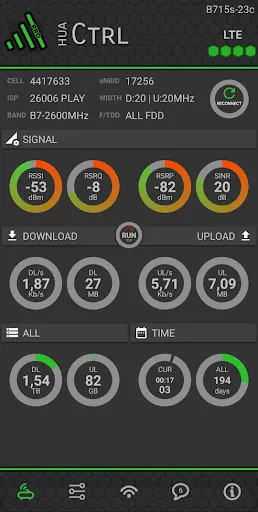
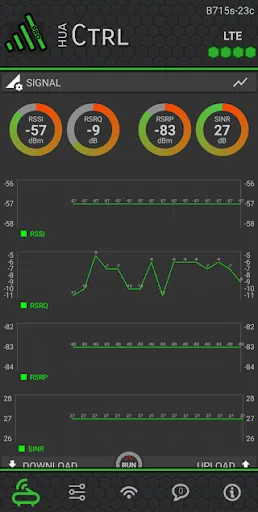
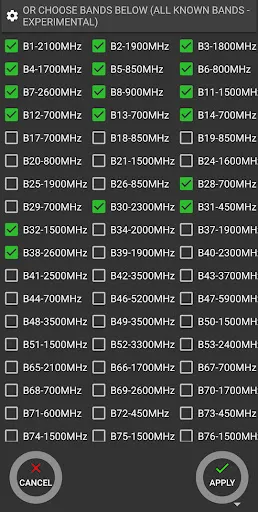
huaCtrl PRO by TheCoder turns your phone into a control panel for Huawei HiLink LTE routers. Check signal and data use, change bands, set up carrier aggregation, view signal charts and your serving cell on a map. It works with non-mobile Huawei routers with admin access, needs Android 6.0 or higher, and is a paid app (about $14.99 on Google Play).
View on Google Play
Opens the Google Play listing
Official store link
Version
1.0.51
File Size
5 MB
Developer
TheCoder
Screenshots & Preview
Click any image to view in full screen
Frequently Asked Questions
Common inquiries regarding huaCtrl PRO for Huawei routers installation & verification
What is huaCtrl PRO?
It is a tools app by TheCoder for managing Huawei HiLink LTE routers from your phone, with signal info, band control and carrier aggregation setup.
Which routers does huaCtrl PRO work with?
Non-mobile Huawei HiLink LTE routers with admin access, tested on models like the B525, B715 and H122. It does not work on prepaid and mobile routers, with some exceptions.
What does the PRO version add over the free version?
A cleaner layout, a map view of your serving cell, signal line charts, the full band selector, cell reconnection options, an SMS manager, no ads, and a signal and speed widget.
Do I need to set anything up on the router first?
Yes. Complete the router's WebUI setup wizard first, which is required on newer routers since 2021, and make sure you have admin access to the router.
How much does huaCtrl PRO cost?
It is a paid app, listed at $14.99 on Google Play.
What Android version do I need?
Android 6.0 or higher.
Similar & Recommended
Other popular downloads in this category






huaCtrl PRO for Huawei routers
Tools · 5 MB